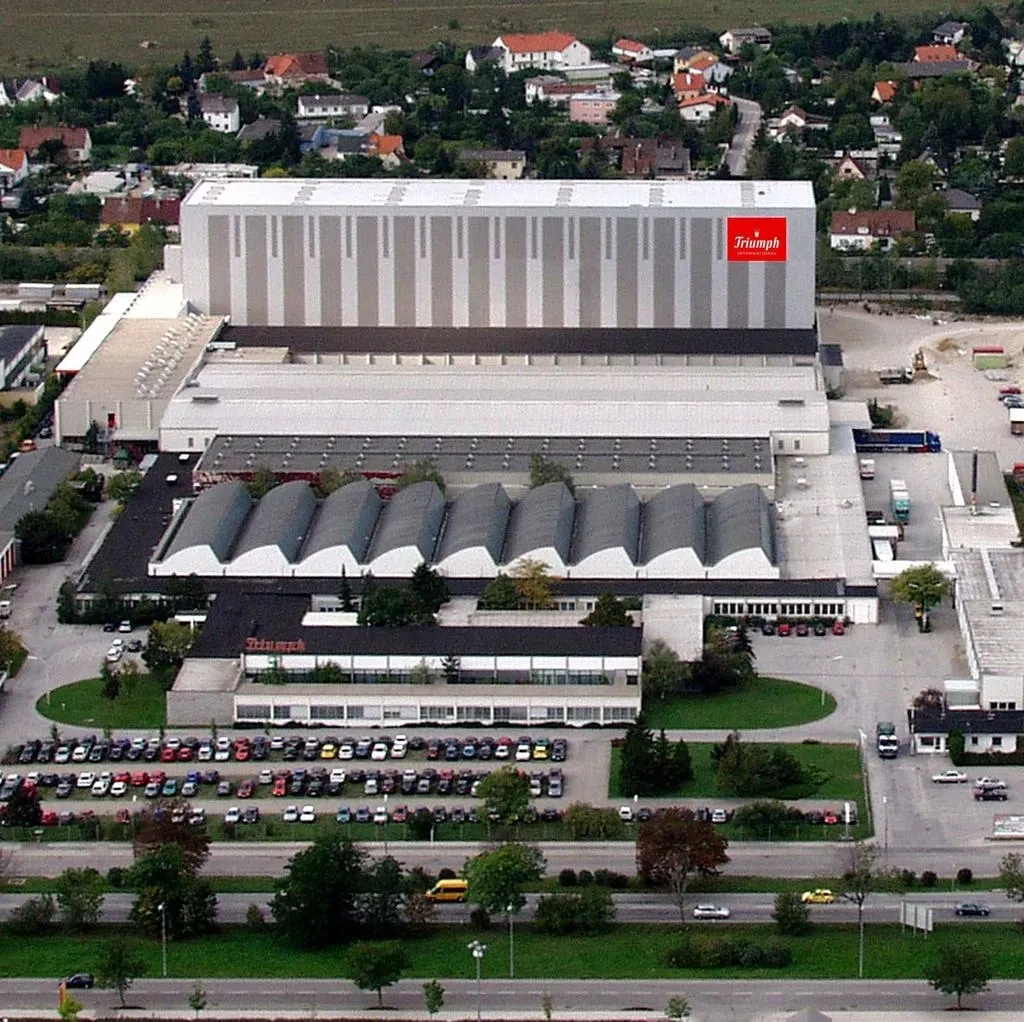
Front view of the HANSA-FLEX company building

„With the Process Parameter App, we have not only digitalised our production, but also taken efficiency, quality and user experience to a new level.“

Joachim RimkusPlant Manager, HANSA-FLEX AG

Hansa-Flex – MES Pro

Custom SAP Fiori app for the manufacture of hydraulic hoses

HANSA-FLEX is a family-owned public limited company operating worldwide, headquartered in Bremen, and one of the world's leading suppliers of products, services and holistic solutions for hydraulics. HANSA-FLEX combines an extensive product range with a broad service portfolio – from highly efficient and flexible repair and assembly services to complex engineering and consulting services. A dense network of branches, specialised production sites, digital services and innovative logistics solutions round off the offering. The company employs more than 4,200 people at more than 445 locations worldwide.

5min

Project
Production optimisation project
Solution
Custom SAP Fiori app for the manufacture of hydraulic hoses

The company

  • Headquarters: Bremen
  • Founded: 1962
  • Founder: Joachim Armerding
  • Revenue: €573 million (2022)
  • Employees: more than 4,200 (2022)
  • Branches: more than 445 in 40 countries (2022)
  • Industry: Mechanical engineering (hydraulics)
  • Values: Sustainability, innovation, quality

Core functions

  1. Display the production order

    The worker scans the production order. The app requests all related information from the SAP Private Cloud.

  2. Drawing display

    Technical drawings, component images and production parameters appear directly in the app. Component check in advance: a visual comparison with the component images shows whether all parts are present and correct.

  3. Complaint check

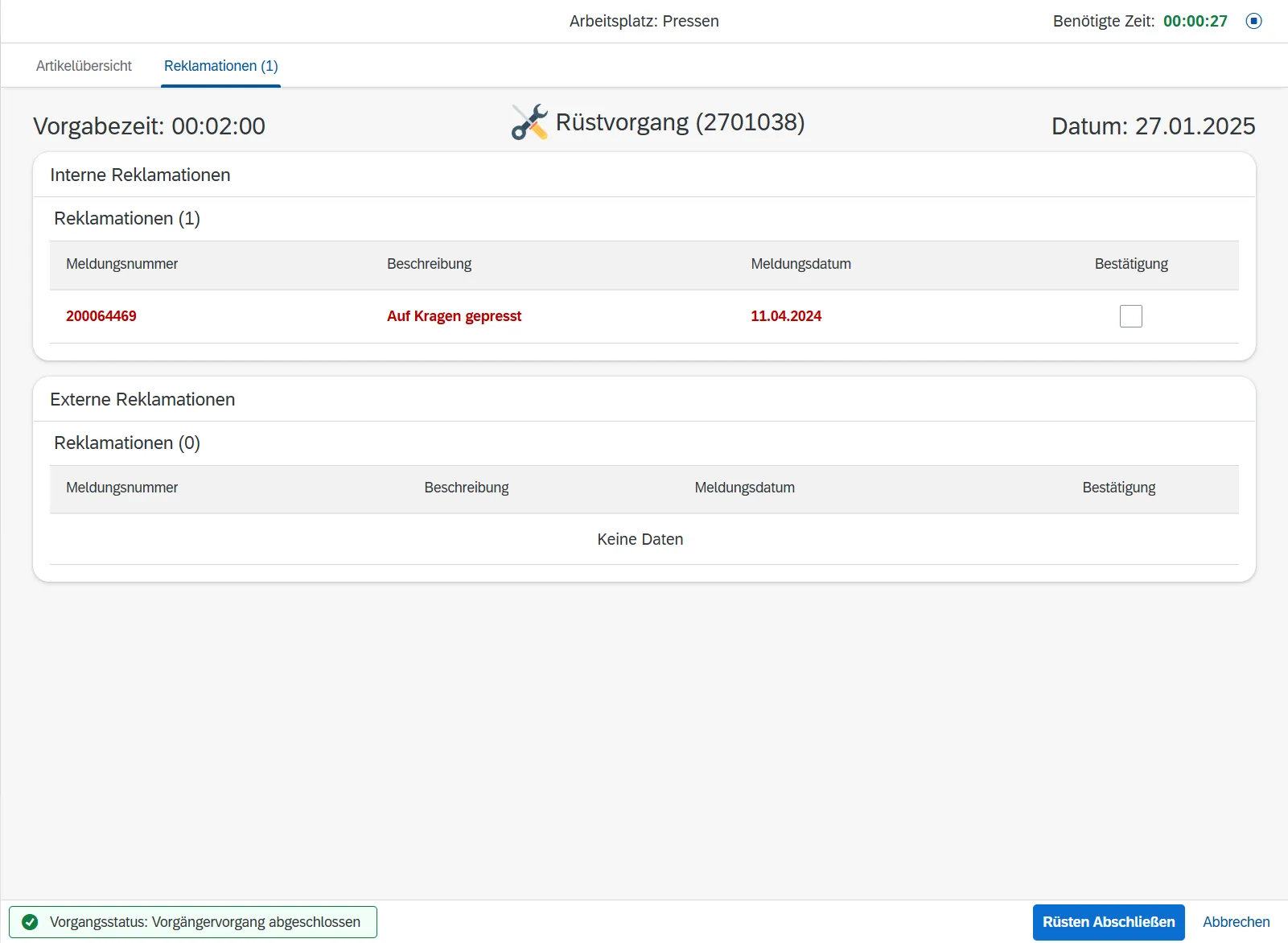
    Complaints are displayed first and must be confirmed by the worker before work can continue.

  4. Real-time machine connection of the hose press

    The hose press sends real-time data to SAP via TCP. The app shows the actual crimping count next to the target value and warns of deviations.

  5. Fail-safe time recording

    Set-up and processing times are recorded automatically and saved to SAP every 30 seconds. After an app crash or reload, work continues seamlessly.

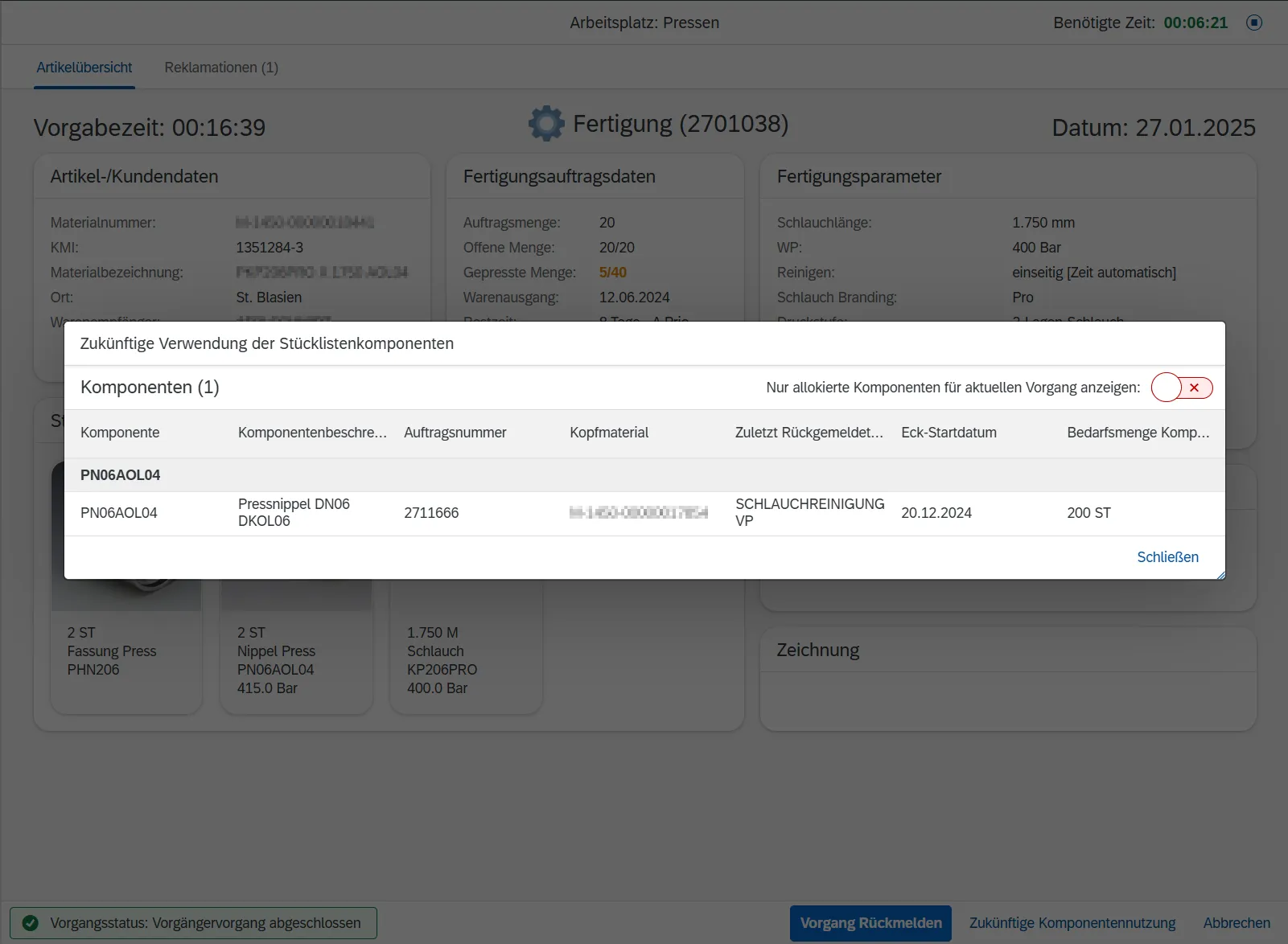
  6. Future component use

    The app shows what the components currently in use will be needed for in future. Material that will be needed again later stays at the workstation instead of being returned to the warehouse unnecessarily.

Initial situation

  • Workers take the relevant production parameters from printed production orders
  • Searching paper documents for important information is laborious and inefficient
  • Workers cannot easily check whether all components required for a production order are present; this can lead to missing, surplus or incorrect parts
  • Important details such as technical drawings or complaints are only available in SAP and therefore awkward for workers to access
  • Set-up and processing times are recorded manually in SAP, which often leads to inaccuracies (actual time is set to target time)
  • Produced quantities are confirmed manually in SAP
  • Workers cannot see immediately how many hoses have actually been crimped
  • A lack of insight into the future use of the components currently in use leads to inefficiencies in material handling

Challenge

  • Develop an intuitive interface that shows all relevant data without overwhelming the user
  • Make the component check easier by displaying images of all required components, so that completeness and correctness are ensured
  • Simplify the confirmation of times and produced quantities in order to reduce errors and increase accuracy and transparency
  • Ensure that complaints are confirmed, so that workers are aware of them before continuing
  • Implement fail-safe time recording that prevents data loss caused by app crashes or reloads
  • Detect incorrect crimping counts in order to improve product quality and minimise errors
  • Provide insight into future component use, so that frequently needed components can stay at the workstation instead of being returned to the warehouse unnecessarily

Solution

  • User-friendly SAP Fiori app: A minimalist, intuitive layout for easy access to all necessary data
  • Integrated key information: Technical drawings, component images and complaints directly in the app
  • Display of component images: The app shows images of all components required for the production order, so that workers can easily check before production starts whether all parts are present and correct
  • Mandatory confirmation of complaints: Complaints are displayed first and must be confirmed by the worker before work can continue
  • Automatic time confirmation: Workers do not have to record their time manually, which reduces errors
  • Regular time backup: The elapsed time is saved to SAP regularly, so that work can continue seamlessly after an app crash or reload
  • Real-time crimping data: Live data from the hose presses is displayed in the app, with the actual crimping count next to the target value
  • Quality notifications: Workers are notified when the actual crimping count deviates from the target of the production order; this increases accuracy and prevents complaints
  • Insight into future component use: The app shows what the components currently in use will be needed for in future. Workers can thus see whether material such as hoses will be needed again later in the day. This avoids unnecessary returns to the warehouse and increases efficiency

Process

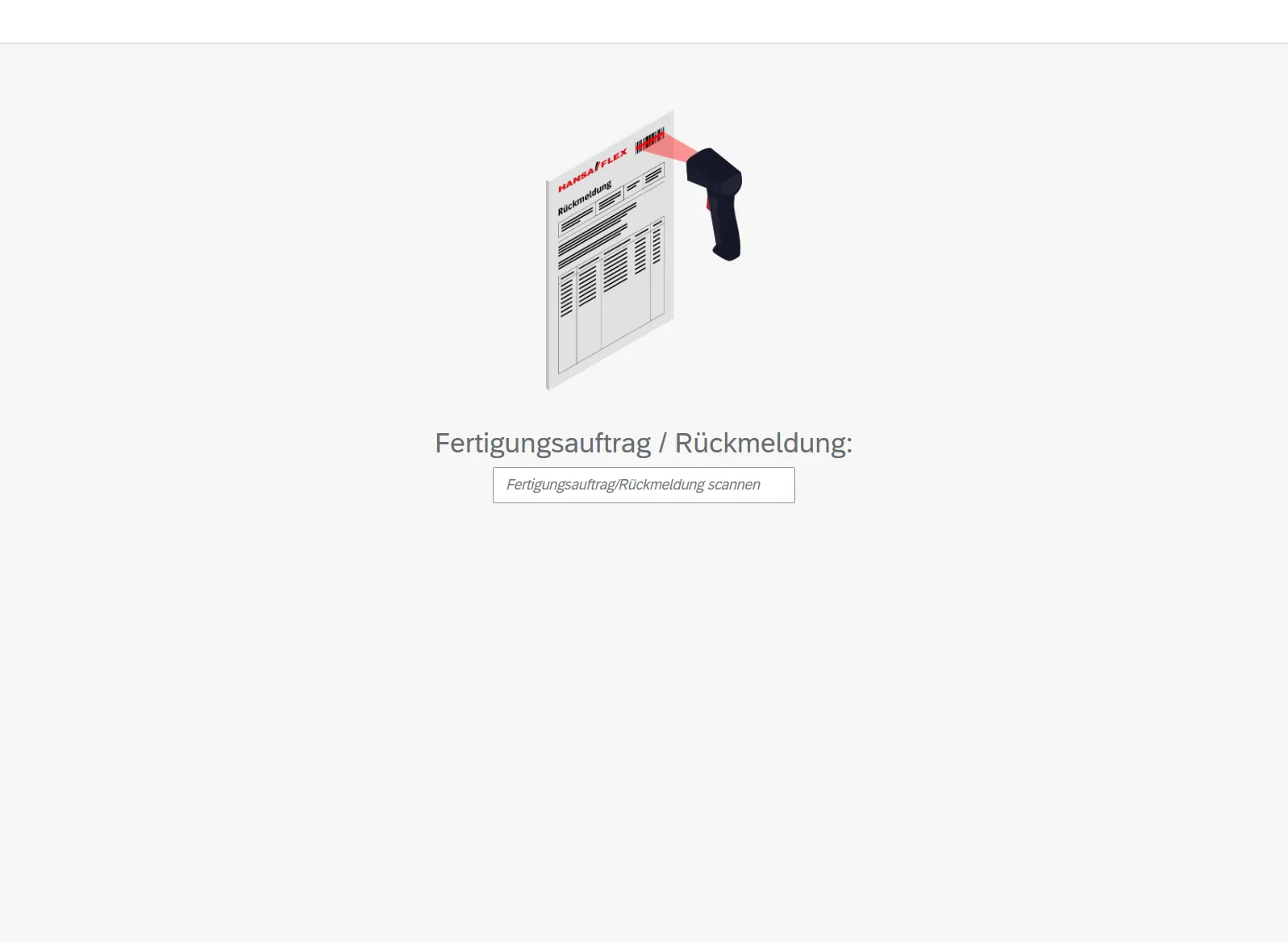
App screen: scanning the production order or confirmation with a handheld scanner
1. Scan the production order
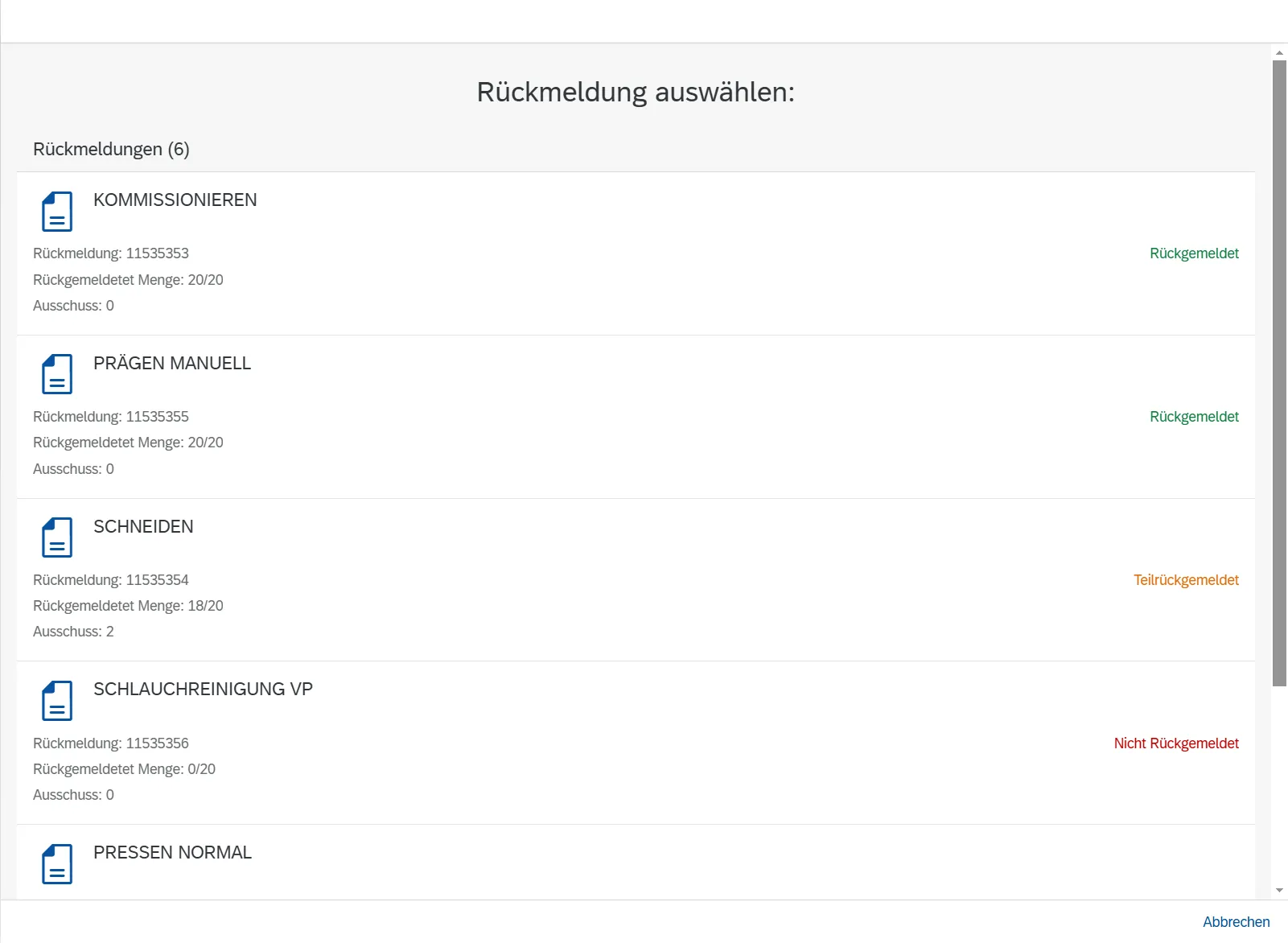
App screen: list of confirmations for the production order with status, for selecting the operation
2. Select the operation of the production order
App screen: set-up operation with a list of internal and external complaints for confirmation
3. Set-up: confirm complaints
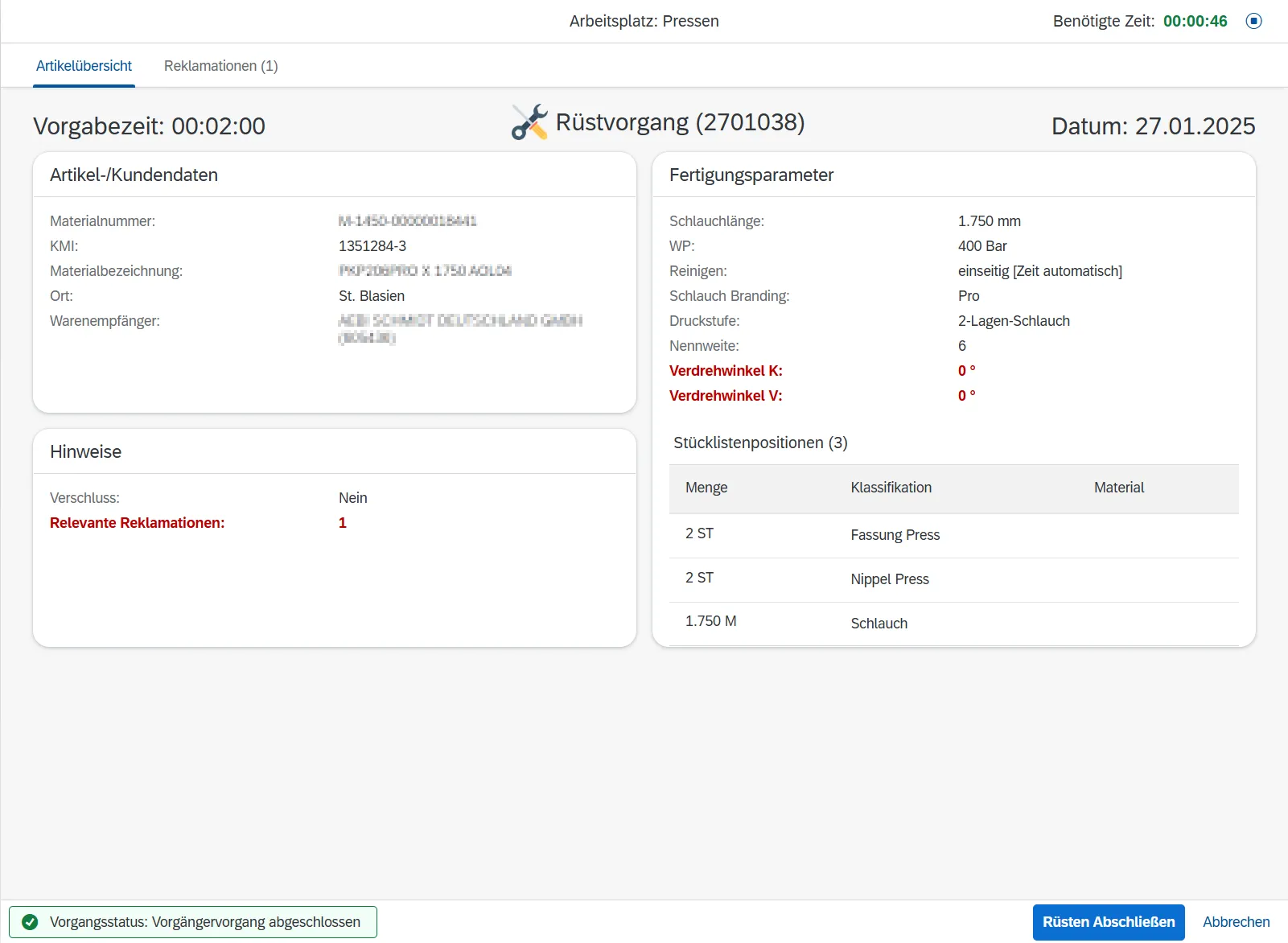
App screen: set-up operation with article and customer data, production parameters and bill of materials items
3. Set-up: overview
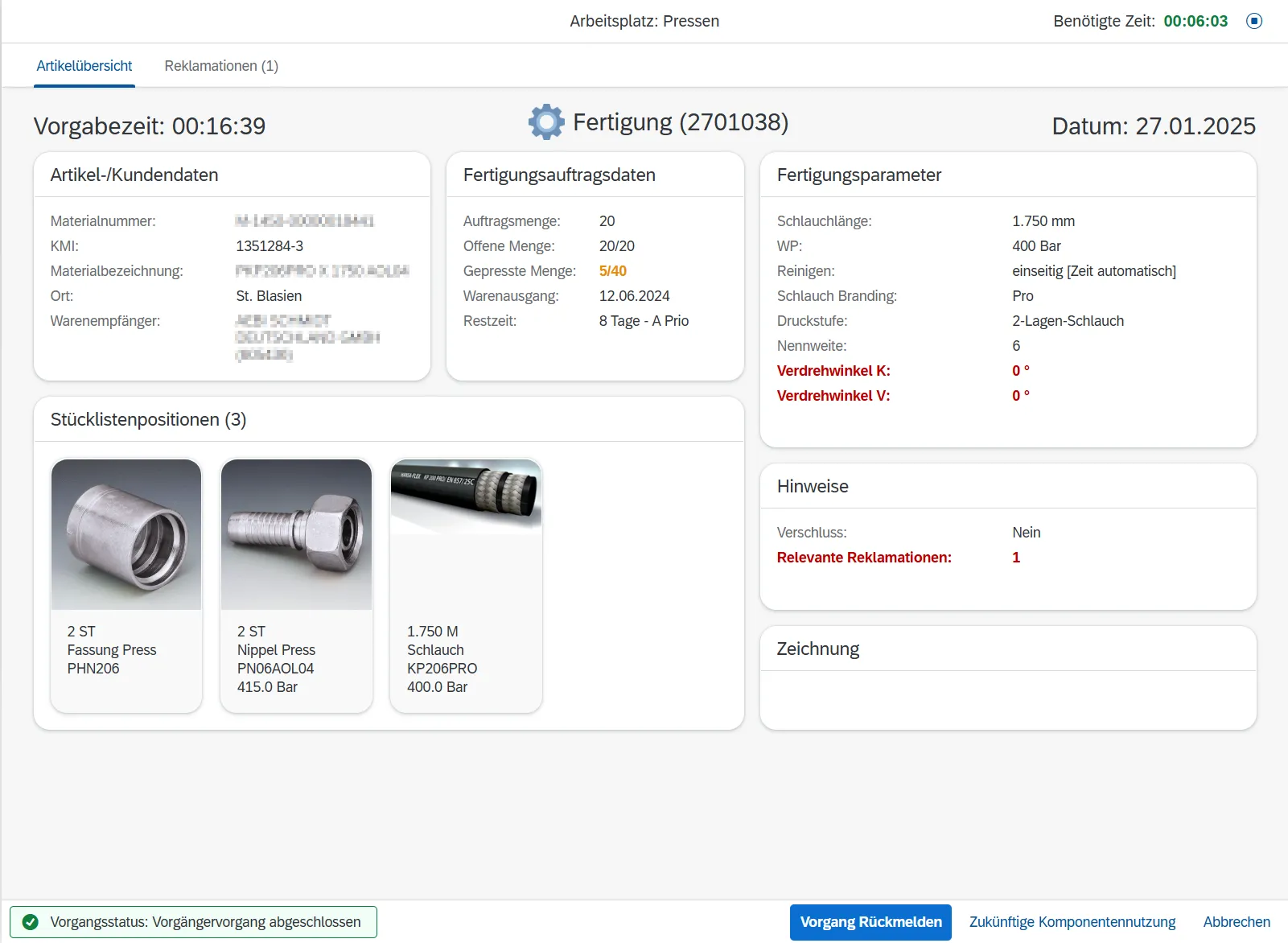
App screen: production with production parameters, crimped quantity and images of the bill of materials components
4. Production
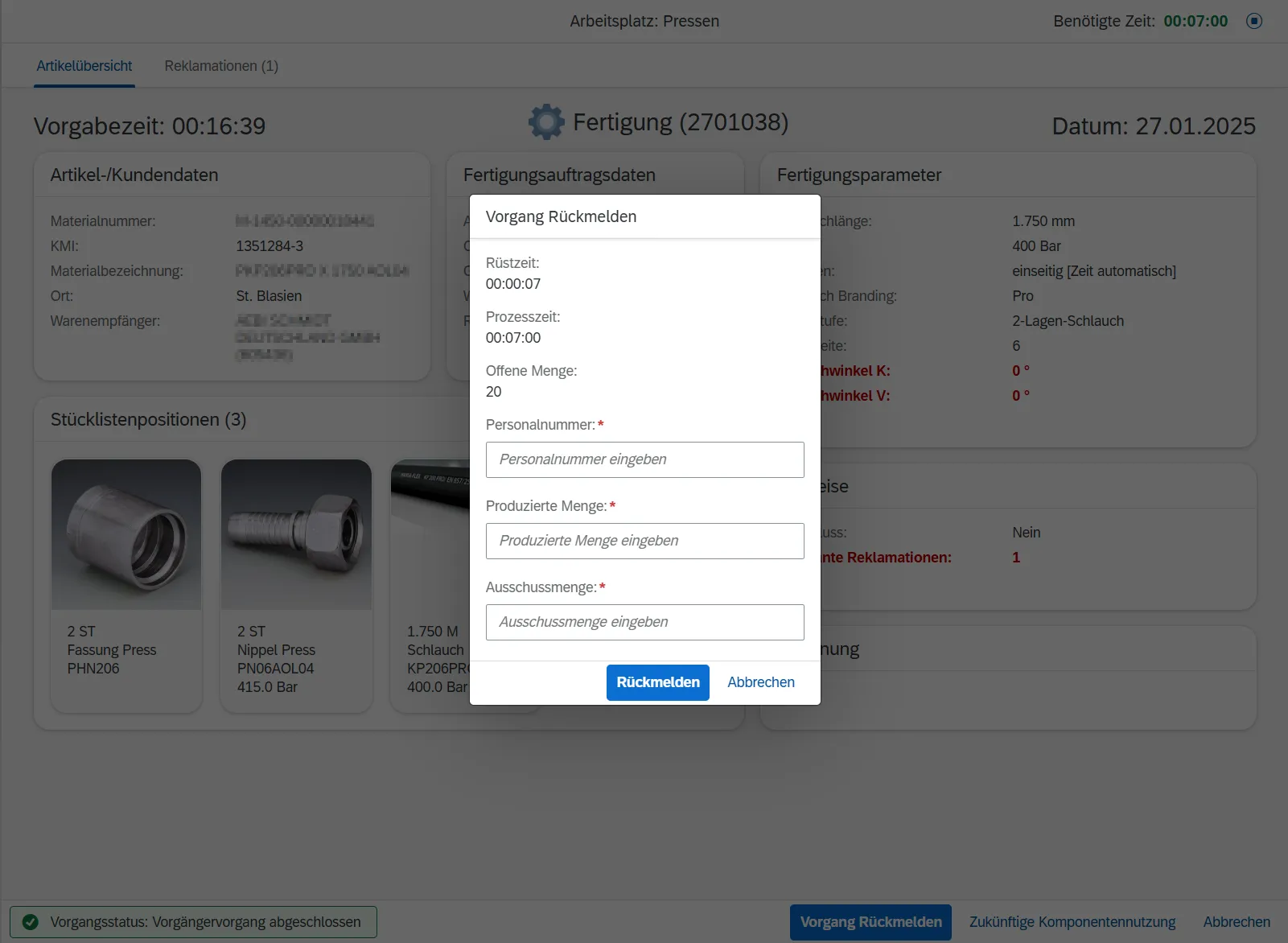
App screen: “Confirm operation” dialogue with set-up time, process time and entry of the produced quantity
5. Confirm the operation
App screen: “Future use of the bill of materials components” dialogue
6. Check future component use

Workstation

The workstation is equipped with an industrial workbench on which all tools for crimping the hoses are at hand. A touchscreen monitor mounted at the workstation shows the SAP Fiori app MES Pro and presents all relevant production data to the workers in a clear and structured way. A second monitor is intended for monitoring and setting up the hose press and provides control and transparency over machine operation in real time. The hose press itself stands directly next to the workers and enables a smooth, efficient flow between digital guidance and practical execution.

Architecture

Shop floor

  • Hose pressDirectly at the workstation
  • Terminal with SAP Fiori appTouchscreen monitor at the workbench
SAP Private CloudProduction orders · Crimping data incl. crimping counter · Saved set-up and processing times
  • Archive and document server
  • File storage for product images

Data sources

System architecture: connection of the hose press and terminal to the SAP Private Cloud

Display and confirmation of the production order

  1. The SAP Fiori app requests the information on the production order from the SAP Private Cloud.
  2. The SAP Private Cloud retrieves images and documents from the archive and document server and from the file storage for product images.
  3. The archive and document server and the image storage deliver all relevant data to the SAP Private Cloud.
  4. The SAP Private Cloud sends the information on the production order to the SAP Fiori app.
  5. The SAP Fiori app confirms the produced quantity and the elapsed set-up and processing time to the SAP Private Cloud.

Time backup

  1. The SAP Fiori app saves the elapsed set-up and processing time to the SAP Private Cloud every 30 seconds.
  2. After an app crash or reload, the SAP Fiori app retrieves the saved time and continues processing seamlessly.

Live data from the hose press

  1. The hose press sends real-time data on the production order to the SAP Private Cloud via TCP.
  2. The SAP Private Cloud stores the crimping data, including the order’s crimping counter.
  3. The SAP Private Cloud transmits crimping updates to the SAP Fiori app in real time via ABAP Push Channel.
  4. The SAP Fiori app displays the order’s current crimping count in real time and warns workers during confirmation if the actual count deviates from the target.

Planning your own shop floor app? Start with our orientation workshop.

More references